|
 |
OneKaraoke HDD-based Karaoke / Jukebox Software for Windows OS
( £245 Lifetime License)
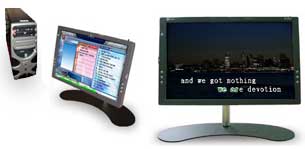
OneKaraoke (OK) is a powerful PC hard disc-based video Karaoke jukebox/ playback system with options to operate using a compatible remote control / keyboard. There are many advantages with OneKaraoke over conventional DVD or other karaoke players:
|
 Where to use OneKaraoke? Where to use OneKaraoke?
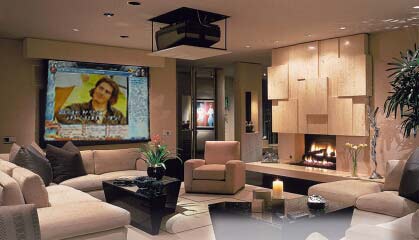
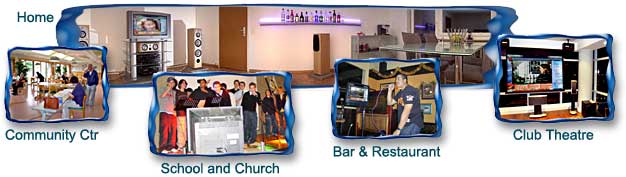
OneKaraoke is ideal for homes, leisure clubs, hotels, restaurants, etc. It provides users a new degree of control & flexibility with uninterrupted enjoyment. OneKaraoke also carries a skinnable user interface so the creative-minded users can change the user interface for differnt occasions (e.g. Birthday Parties, Sweet 16 Parties, Holiday Parties, Anniversaries, Reunions, Graduations, Outdoor Parties, Awards Banquets, Fund Raisers,etc). And its expandability means you can simply install it on your existing PC, or integrate with your audio system to deliver the ultimate in karaoke experience.
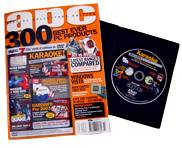
Left Image: OneKaraoke was nominated and recommended in a reputable APC Magazine (2008). |
- Home
- Club
- Karaoke Bar
- Community Center
- Church
- Concert Hall
- Hotel & Restaurant
- etc.
|
 |
|
| |
Purchase and Delivery Method
 OneKaraoke software license costs US$45 and includes one license for use in one PC. Delivery is by electronic download (link & license instruction will be provided on a separate email shortly after purchase). You can pay by paypal or major credit cards. Click the following button to access paypal's secured payment gateway. We suggest you to download the trial version for checking its features and user manual before making purchase. If you require optional remote control or keypad contact us for more information. Songs are not included in OneKaraoke but there are many tools out there that convert your karaoke collection into computer files for storing into hard drives. Trial version is also available for download. Please review the license agreement here. OneKaraoke software license costs US$45 and includes one license for use in one PC. Delivery is by electronic download (link & license instruction will be provided on a separate email shortly after purchase). You can pay by paypal or major credit cards. Click the following button to access paypal's secured payment gateway. We suggest you to download the trial version for checking its features and user manual before making purchase. If you require optional remote control or keypad contact us for more information. Songs are not included in OneKaraoke but there are many tools out there that convert your karaoke collection into computer files for storing into hard drives. Trial version is also available for download. Please review the license agreement here.
|
We have several refurbished OneKaraoke Systems and they include everything you need to enjoy karaoke (yes with the optional remote controller). Just connect a display and power up and have fun!
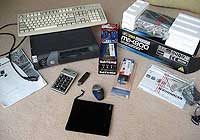 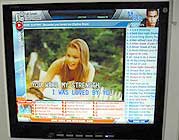 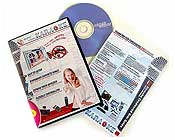
Stock update: 0 left ( as of Jan 2011) please contact us if you are interested in purchasing a new or refurbished OneKaraoke system using the form below. Thanks.
Features at a Glance
|
Features |
Description |
|
Comprehensive File Type Support |
Most popular file types are supported, including mpg, wmv, avi, dat, mov, mid, kar, mp3, wma, etc. |
|
Flexible Content Management |
You decide how your songs are organized and no complicated admin tool to deal with. Only basic Windows file management knowledge is sufficient for OneKaraoke administration. |
|
Media Transport Control |
Fast Forward, Rewind, Replay, Pause, Skip Song, Delete Song in Queue, Move Song to Queue Top, etc. |
|
Ease of Operation |
Operated by keyboard, numeric-keypad, or optional handheld infra-red remote control for "mouseless" operation |
| Full screen or Framed Video area
|
Intuitive user interface that supports framed video or full screen playback tailored for single-screen setup |
| Automatic Content Update
|
Automatically load song files from hard disk folders |
| Dual Monitor Support
|
Separate GUIs that support single and dual PC screens |
| Skinnable User Interface
|
Ability to personalize most user interface graphics with own designs |
| Worldwide Song File Language
|
Foreign language filename compatibility (Windows OS version specific) |
| Audio Output Channel Control
|
Adjust and memorize multiplexed audio Left/Right/Stereo setting for each played song, with automatic level compensation |
| Personal Bookmarks
|
Personal bookmarks (i.e. used-defined Song Queues) for recalling frequently-played songs |
| Song Index Printing
|
Create song book by printing Song List to default printer |
| Usage History
|
Automatically generate usage histories in html format, all consolidated into one file. |
| User Definable Song Categories
|
Up to 20 song categories with unlimited number of songs can be created |
| Unlimited Songs in Queue |
Unlimited number of songs can be queued in each Song Queue and bookmark |
| Juke Box Mode |
Jukebox mode for adding whole song list into Song Queue |
| Network Storage Support |
Supports centralized song storage on LAN for setting up in multiple rooms. |
| Technical Support |
Technical support and professional setup advices via email |
| Free Upgrade |
Free upgrade to future versions |
we have compiled a quick start guide here.
Optional Accessory
|
|
 Optional Controllers Optional Controllers |
|
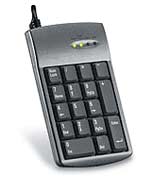 Numeric Pad
 |
While you may already be equipped with a PC keyboard (wired or wireless) to operate "OK", we recommend the following add-ons that will greatly enhance the OneKaraoke experience:
- Numeric Keypad - can be purchased from most computer shops; or
- Handheld Infra-red Remote Control - you may use a fully programmable remote control to learn and simulate keyboard keystrokes. This kind of device uses Infra-red (IR) technology and require you to have a IR receiver of some kind, and is not compatible with RF receivers. And not all programmable remote store PC keystrokes, users need to check with respective supplier. OneKaraoke.com have a limited supply of programmable controls which are already pre-programmed with the correct keystrokes. If you are interested in getting one of these, please contact us for details.
|
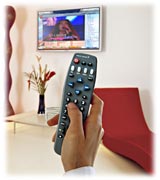
Handheld Remote
|
|
|
Dual Monitor Option |
|
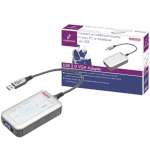 |
If you intend to use OneKaraoke software on dual view mode, you will need a PC with 2 separate VGA outputs and operate in Extended Desktop mode (Windows). Some laptop can do so with its internal LCD and its external display. If your laptop or desktop has only one screen, you can expand it into a second screen by employing a USB to VGA docking station such as Sitecom CN-105. We have a limited stock of CN-105 at bargain price. Please contact us to confirm stock availability and price to your country. Note that this Sitecom adaptor is not Vista/Windows 7 compatible. |
Product info:
 |
|
|
|
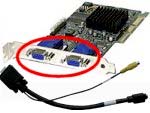 |
OneKaraoke also supports lots more display cards of various brands and makes. As long as your PC (or laptop) can use that card to display dual view on 2 monitors, OneKaraoke would work with it. With dual view, you can have one PC screen displays full-screen video at all time, while another screen displays just the user interface (song queue etc). |
|
 |
- Intel® Pentium® III 933MHz, AMD Athlon™ 800 MHz, or higher
- Microsoft® Windows® 7, 8, 10, 11
- 128 MB RAM (256 MB or above is recommended)
- 40 MB of available hard drive space for program installation
- DirectX® Runtime 8.1 driver or above
- Windows® compatible sound card
- Windows® compatible display with XGA (1024 X 768) resolution
- Windows® compatible wired or wireless keyboard (Infra-red, RF, etc.)
- Also check the optional PC and audio requirements by visiting the Support section.
|
|
©2026 OneKaraoke.com, All rights reserved |
|
|
|

 Easily installed on Windows PC and organise your karaoke videos in folders;